
Unhashed emails in tracking pixels: how to find them
Checked against Google, Meta and TikTok documentation on
If you can read a customer's email address in a tracking request, the ad platform can read it too. The simplest leak needs no code at all: a thank-you page URL that contains the email, because pixels send the page URL. Meta's pixel hashes a lowercase email passed to init with SHA-256 and accepts pre-hashed values, but a URL, an image-tag pixel or a custom call can carry the raw address.
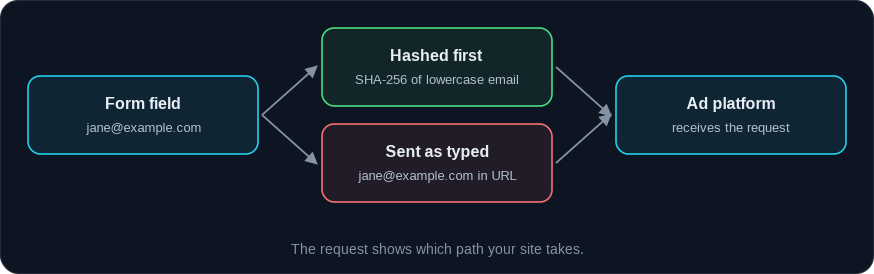
The leak that needs no code
Some sites redirect to /thank-you?email=jane@example.com or append the address to a confirmation link. Every pixel on that page sends the page URL along with its event, so the address travels to every platform at once. If you have ever tracked a lead form, check this one first.
Other ways an email gets out
- A custom
fbqorttqcall that passes the address as typed. - An image-tag pixel. Meta says that method needs data you have already formatted and hashed with SHA-256.
- Automatic matching on a page with form fields you did not intend it to see. Review which fields it can read.
Finding them in a request
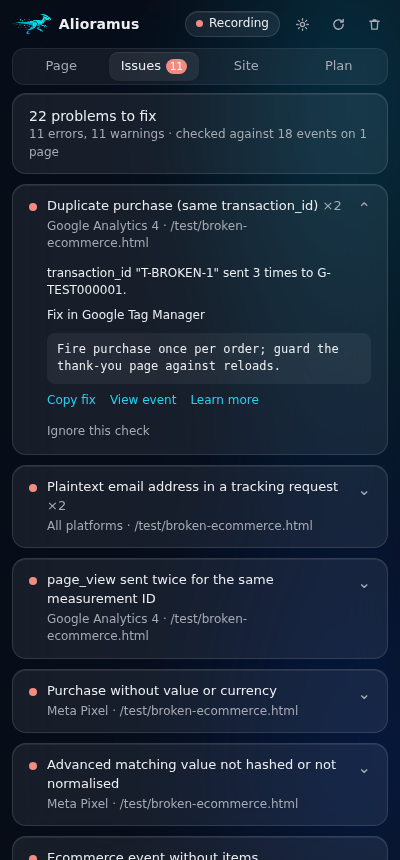
Submit a test form with an address you will recognise. In Alioramus the Issues tab raises Unhashed email addresses and shows the request, for example a Meta Purchase whose URL contains the address. By hand, search the Network tab for the address and for %40, which is how @ looks in a URL.
Hashing it correctly
Normalise first: trim spaces and lowercase. Then hash with SHA-256 and send the hex string. Meta says the pixel hashes a lowercase email itself when you pass it in the init call, and that it accepts normalised SHA-256 values. Hash the normalised value, because a hash of an unnormalised address may not match. Advanced matching parameters belong in the pixel base code; values placed elsewhere are not treated as manual advanced matching.
Fixing it, and one limit
- Take email addresses out of URLs and pass an order number.
- Hash before sending in every custom call and image tag.
- Re-test and search the requests again for your test address.
Hashing hides the value in transit, but the identifier can still be matched, so it can still count as personal data under laws such as the GDPR, and consent still applies. This is not legal advice. Google also states in its Analytics terms that you may not send personally identifiable information to Analytics, so the same search applies to GA4 requests. Consent order is covered in the Consent Mode guide.
Questions people ask
Does Meta hash emails for me?
Its pixel hashes a lowercase unhashed email passed to init with SHA-256. An image-tag pixel needs data you hashed yourself.
Is a hashed email anonymous?
No. It hides the value in transit, but it can still be matched, so treat it as personal data.
Can an email in a GA4 event parameter cause a problem?
Yes. Google's terms prohibit sending personally identifiable information to Analytics.