Duplicate purchases
The same order reported twice, so revenue and return on ad spend look better than they are.
transaction_id "T-1042" sent 2× to G-XXXXXXX
Pixel debugger and setup agent for Chrome
Alioramus shows every tracking pixel and analytics tag your page sends, in plain language — and checks each hit against 100 rules for the mistakes that quietly break attribution.

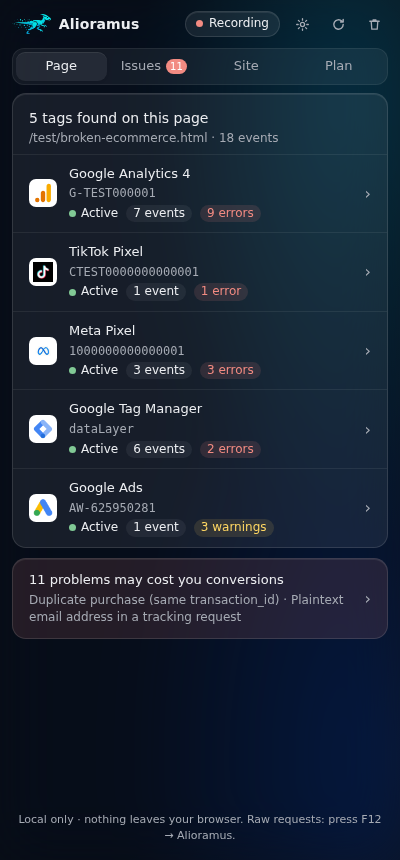
From the network hits and from the page calls behind them.
G-…GTM-…fbqAW-…ttqlintrkuetqpintrksnaptrtwqrdt_tfaobApiaxonUA-…soonYour ads report a number. These are the reasons it is wrong — and Alioramus catches each one with the event that proves it, why it matters, and how to fix it.
The same order reported twice, so revenue and return on ad spend look better than they are.
transaction_id "T-1042" sent 2× to G-XXXXXXX
A conversion value with no currency is a number the platform cannot count as revenue.
"add_to_cart" value=29.99, currency missing
A plain email in a tracking request is personal data handed to an ad network.
Meta "Purchase" URL contains j…@example.com
Consent defaults have to arrive before the first hit, or the first hits ignore them.
consent update seen with no earlier default
gtag next to Tag Manager, or a theme plugin next to your own setup: every event counts double.
page_view sent twice for one measurement ID
The script loads, so it looks installed. The events never leave the page.
Meta Pixel loaded, 0 events sent
The side panel sits next to your site and tells you what is going on without DevTools, request URLs or guesswork.
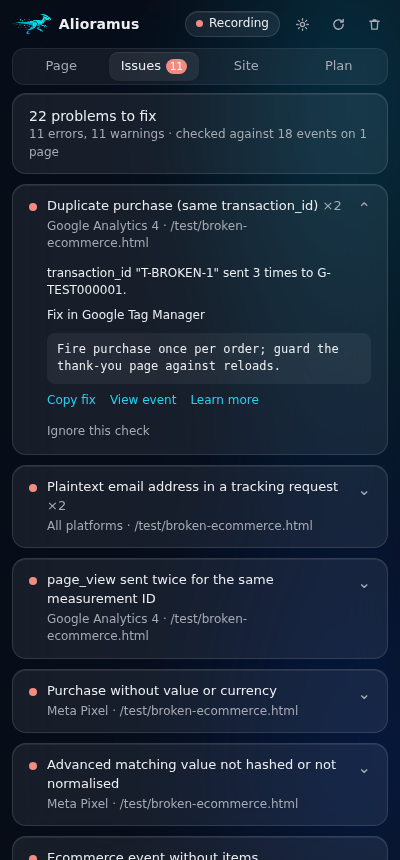
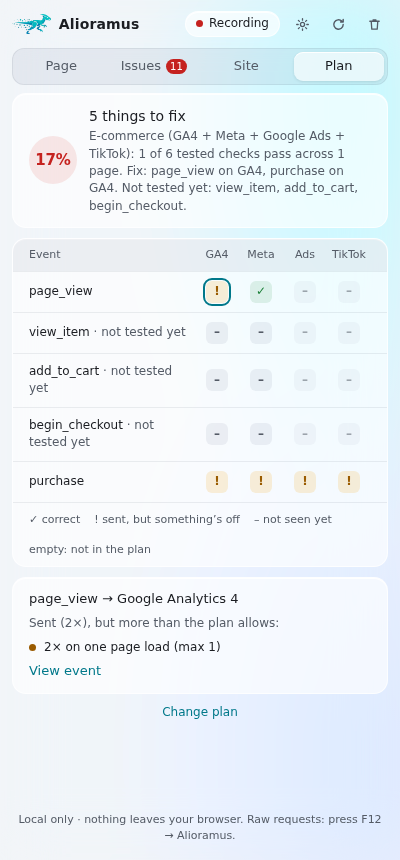
No account and nothing to set up.
The icon counts the tags every page sends, and turns red when one has an error.
The side panel opens next to the page with Page, Issues, Site and Plan.
The setup agent · paid add-on
Say it in plain words: “track purchases and lead forms, and send them to Meta, Google Ads and GA4 with values.” The agent does the work across every platform, in your own browser, and asks before every change.
Reads your site — its forms, thank-you pages and what already fires — and drafts a tracking plan for you to approve.
Creates the tags, triggers and variables in a Google Tag Manager workspace, plus GA4 key events and Google Ads conversion actions. Reuses what is already there.
Links Meta, TikTok and your other ad platforms, through their APIs or in your own logged-in tabs.
Walks your funnel on the unpublished draft with test submissions and checks every event before anything goes live.
Goes live only after the tests pass and you approve, with a report of what changed. Every change is kept in an activity log.
Plan for yourstore.comNeeds approval| Event | GA4 | Meta | Ads |
|---|---|---|---|
| purchase | ✓ | ✓ | ✓ |
| generate_lead | ✓ | ✓ | ✓ |
| add_to_cart | ✓ | ✓ | – |
The debugger costs nothing. The setup agent is a paid add-on, coming soon.
Get early accessAlioramus has no server, and the debugger sends nothing anywhere. Chrome asks for access to the sites you visit because a pixel helper has to see the tag traffic of whatever page you are checking — requests are observed, never blocked or changed. The setup agent talks only to the services you connect, and only for the work you ask for.
F12 → Alioramus
Raw requests and responses, the page calls behind every hit, recordings that span pages, and export to JSON or CSV with identifiers pseudonymised.
dataLayer.push({ event: "purchase", value: 59.98 }) → GA4 purchase 59.98 USD sent → Meta Purchase 59.98 USD sent → GA4 purchase 59.98 USD duplicate → TikTok CompletePayment 0 USD value differs
No account, nothing to configure. Works in Chrome 128 and newer.
Add to ChromeFree on the Chrome Web Store.