
TikTok Pixel and Events API deduplication: fixing a mismatched event_id
Checked against Google, Meta and TikTok documentation on
Quick version: TikTok deduplicates a Pixel event and an Events API event that carry the same event name and the same event_id, and its help article says to share the ID through both. Matching Pixel and Events API events are merged when the later one arrives after 5 minutes and within 48 hours of the first, and TikTok keeps the first event it received. A mismatched ID is a common reason the same order appears twice.
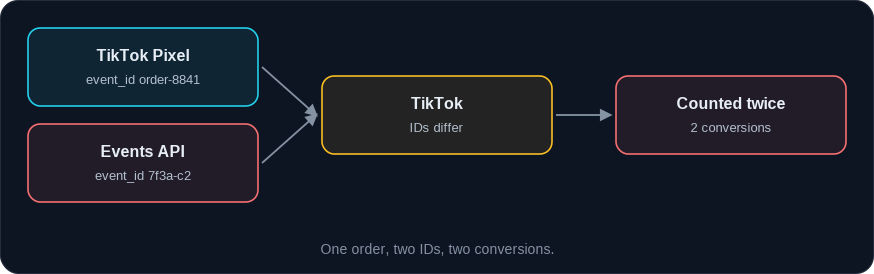
Send the ID from the pixel
The event ID goes in the third argument of ttq.track, an options object, not inside the properties object:
ttq.track('Purchase',
  { value: 59.98, currency: 'USD' },
  { event_id: 'order-8841' });
Your server then sends the same value as event_id in the Events API call, with the same event name. Use the order number for purchases and a UUID created in the browser for events that have no natural ID. Generating the ID separately on the server is what produces the mismatch.
A naming note: TikTok renamed its standard events in May 2025, and CompletePayment became Purchase. Older names still work, but new setups should use the new ones, on both sides.
The windows TikTok describes
TikTok's English help article gives two windows. Repeats within the same channel, Pixel to Pixel or API to API, are deduplicated within 48 hours. For a Pixel event and an Events API event, matching events are merged when they arrive after 5 minutes and within 48 hours of the first one. TikTok keeps the first event it received. Other language versions of the article word this differently, so read the live English page before you plan around the 5-minute figure.
The mismatched event_id warning
When the two sides do not share an ID, Events Manager can show a mismatched event_id warning. Elevar's documentation explains it as the ID needing to be unique for each real event, such as an order ID, and identical on both sides. These are the causes worth ruling out:
- Each side generates its own random ID.
- The ID is present on only one side.
- The ID is the same constant for every event, so it is not unique.
- The event names differ between Pixel and Events API.
- A store app and a custom setup both send server events.
Checking both halves
Alioramus decodes TikTok pixel events including event_id, so you can read the browser half on your confirmation page. The server half is not visible in a browser: use Test Events in TikTok Events Manager and look for one conversion per action. TikTok's developer documentation may add detail beyond its help articles, such as a cookie-based fallback, so read it before relying on one. Meta follows a similar rule with different timing: the Meta version. If the browser itself sends two purchases, that is a separate problem.
Questions people ask
What if I only use the TikTok Pixel?
There is no Pixel versus API overlap, but TikTok also deduplicates repeats inside the same channel within 48 hours when they share an event name and event_id.
Which value should event_id take?
One that is unique to the real event and identical on both sides, such as the order number for a purchase.
Is CompletePayment still valid?
It is a legacy name that TikTok still accepts. TikTok renamed it Purchase in May 2025.