
GA4 purchase event firing twice: causes and fixes
Checked against Google, Meta and TikTok documentation on
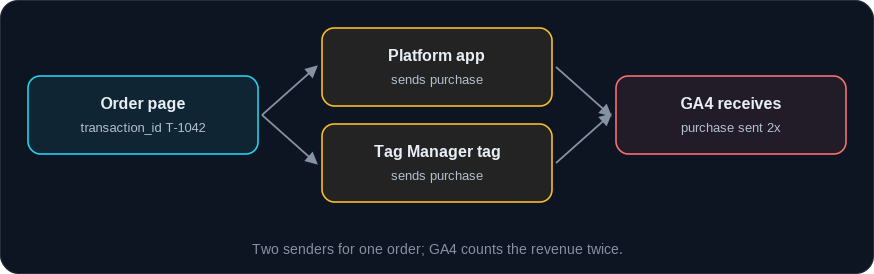
Your purchase fires twice because two things send it, or because the thank-you page runs again on a reload. GA4 drops a repeat only when both copies carry the same, non-empty transaction_id; otherwise both count. Remove the second sender first, then add a reload guard.
Which symptom points to which cause
| What you see | Likely cause | First check |
|---|---|---|
Two purchase hits a few seconds apart, same transaction_id | Two senders, such as a store app plus a Tag Manager tag | List every container and tag the page loads |
Two hits for one order, different transaction_id | Two senders reading different IDs (order number versus checkout token) | Compare the ID in both requests |
| One extra hit when the customer refreshes | No reload guard | Reload the confirmation page and count the hits |
| Fewer purchases than orders | Empty or reused transaction_id | Look for transaction_id="" or one ID on many orders |
To count hits, open the Network tab, filter for collect and look at the en parameter of each request: en=purchase is the event. Alioramus does the counting for you. It lists a purchase it saw twice for the same transaction_id with both requests side by side, and it has a separate finding for a purchase fired on reload or back navigation.
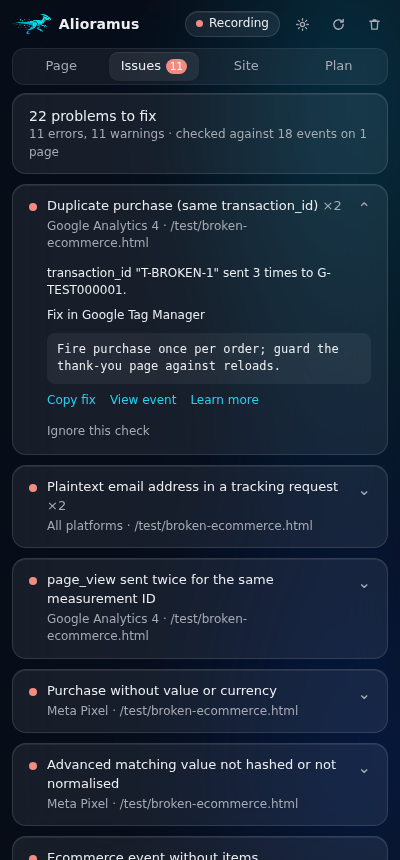
transaction_id; the two requests are listed under it.Fix the sender first
If you can fix only one thing, remove the second sender. A reload guard on a page that still has two senders hides the symptom in one report and leaves GA4 and your ad platforms disagreeing.
The classic pairing is a store app that sends purchase on its own and a GA4 event tag in Tag Manager that sends it again. One Shopify merchant thread describes exactly this: the Google app was already sending purchase data to GA4, so a separate GA4 tag in the container doubled it. The other common pairing is a hard-coded gtag.js next to a Tag Manager container, or a theme and a plugin that both load the container. Google's validation guide says to keep one Google tag or one Tag Manager instance per page.
Once there is a single sender:
- Read
transaction_idfrom the order on the confirmation page, never from a constant or a cached value. - Push
{ ecommerce: null }before each ecommerce event, so the previousitemslist is not carried into the next one. - Add the reload guard: after the first push, store the order number and skip the push when it is already stored.
Pick the storage on purpose. sessionStorage is per tab, so the same order opened in a new tab sends again. localStorage survives, but it also blocks a legitimate re-send after a failed first attempt. For most stores the second problem is rarer than the first.
What GA4's own deduplication will and will not save
Google's help page says GA4 deduplicates purchase events that have the same transaction ID, and the developer guide says it keeps the first event and ignores the second, even if the values changed. For app streams, Google says to send the ID through the Firebase SDK.
Two traps turn that into a data problem. Google warns against sending an empty string: it will deduplicate all purchase events that have transaction_id="", so real orders are lost. It also warns that sending the same ID for different transactions can significantly undercount your key events.
Meta and TikTok have their own rules for browser and server copies of an event. They are covered in the Meta event ID guide and the TikTok event_id guide.
The days before the fix stay inflated
Fixing the sender stops new duplicates. Orders already counted twice remain in your reports, so write down the date of the fix and compare before and after separately. Standard reports can lag, so judge the change on complete days, not the afternoon you deployed. Once purchase is clean, check that every monetary event also carries a currency: the currency rule is next.
What a browser check cannot see
A browser debugger sees what the browser sends. A purchase sent from your server, for example through the Measurement Protocol, never appears in it. If the numbers still disagree, compare the orders in your shop admin with GA4 purchases for the same day.
Questions people ask
My GA4 purchases are lower than my orders. Could duplicates be the cause?
The opposite is more likely. An empty or reused transaction_id makes GA4 treat different orders as repeats and drop them. Check for transaction_id="" and for one ID shared by many orders.
sessionStorage or localStorage for the reload guard?
sessionStorage is simpler and resets per tab. Use localStorage if customers often reopen the confirmation link in a new tab.
Why do GA4 and Meta show different purchase counts?
Each platform applies its own deduplication and its own definition of value. Check each one against the same order before blaming either.
How do I stop the thank-you page from sending a purchase on every refresh?
Store the order number after the first push and skip the push when it is already stored. A server-side "already reported" flag on the order works too.